Youtube End Screen V2 | Premiere Pro: Elevate Your Channel's Finale
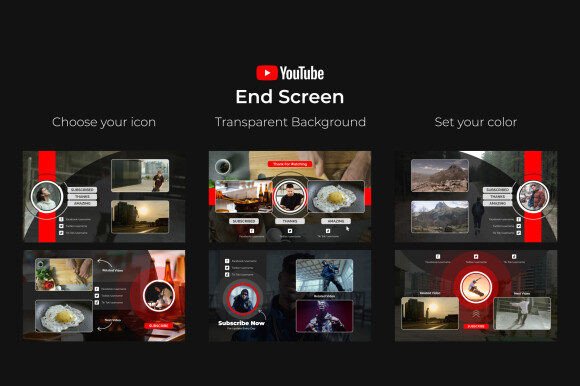
That final 20 seconds of your video are prime real estate. It's where casual viewers become subscribers and where a single click can lead to another view, another like, another share. Yet, so many creators let this space fade to black or use a static, uninspired graphic. The Youtube End Screen V2 | Premiere Pro template is designed to change that. It's not just an outro; it's a dynamic, professional tool built within Adobe Premiere Pro to transform your video endings into powerful engagement engines. This template provides the sleek animations and customizable elements needed to guide your audience seamlessly to your next piece of content, your subscription button, or your social media profiles, all while reinforcing the quality of your brand.
Anatomy of a High-Performance Outro
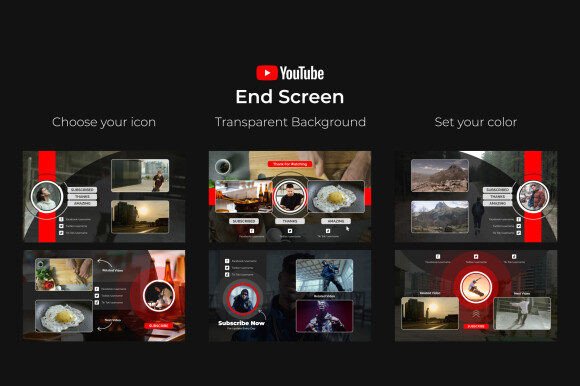
What sets this template apart is its focus on both aesthetics and function. The visual personality is clean, modern, and energetic. It uses smooth, professional motion graphics to draw the eye without being distracting. The overall appeal lies in its versatility and polish—it feels like a custom piece of motion design rather than a generic clip you downloaded.
The core of the Youtube End Screen V2 system is its transparent background. This is a game-changer. It means the end screen can be layered over your actual video footage, creating a cohesive and immersive final moment. You're not just slapping a graphic on top; you're integrating your call-to-action directly into the viewing experience. The design includes three distinct slots for social media icons, each with its own animation style. You can choose your icons—be it for Instagram, Twitter, a website, or Patreon—from a simple dropdown menu, making customization incredibly straightforward.
Control is centralized through dedicated layers in Premiere Pro. A single Color & Icon Control Layer allows you to change the color scheme of the entire end screen to match your brand's palette in seconds. This ensures your outro is not an afterthought but a consistent extension of your brand identity. The template is built to work with any font you choose, with links to the fonts used in the preview included, giving you full typographic freedom to match your channel's voice, whether it's bold and graphic or clean and minimal.
Practical Applications Beyond the Final Frame
While its primary home is YouTube, the principles and assets within this Premiere Pro template have broader applications for any creator or marketer working with video. Think of it as a masterclass in creating effective, short-form social media graphics with motion.
For content creators and bloggers, the end screen is a critical piece of audience retention strategy. A well-designed outro can significantly increase your average view duration by funneling viewers to a playlist or a related video. The animations in this template are crafted to catch attention during the most crucial moment—the decision to click or scroll away.
For entrepreneurs and small business owners using video for marketing, this template adds a layer of professionalism that builds trust. Imagine ending a product demo or a customer testimonial with a sleek, animated prompt to visit your website or follow your business page. It turns a simple video into a polished marketing asset that works harder for your brand. The ease of use means you don't need a dedicated motion graphics artist to achieve a high-end look.
The design's clean lines and modern animation style also make it suitable for more than just YouTube outros. The individual animated elements—the icons, the subscribe button, the background panels—could be repurposed as lower thirds, transition elements, or interactive buttons in other video projects, such as corporate presentations, online course modules, or event highlight reels. It's a versatile design asset that grows with your creative needs.
Integrating the Template: A Guide for Creators
Getting the most out of the Youtube End Screen V2 | Premiere Pro template is about thoughtful integration, not just technical execution. Here’s how to approach it for maximum impact.
1. Brand Alignment First: Before you even import the template, have your brand's hex color codes and primary social media icons ready. Use the Color & Icon Control Layer to make these changes immediately. This ensures the end screen feels native to your channel. Consider the mood of your content—a gaming channel might use vibrant, high-contrast colors, while a cooking tutorial might opt for warmer, more subdued tones.
2. Font Choice with Purpose: The template's compatibility with any font is a major strength. Don't default to the preview font. Choose a typeface that reinforces your brand's personality. If your logo uses a bold sans serif font, use that for the "Subscribe" call-to-action. If your channel has a more personal, handwritten vibe, a script font for your name could work. Always prioritize readability—these elements need to be clear even on a small mobile screen. Test your chosen font at a reduced size to ensure it holds up.
3. Strategic Content Placement: The three social media icon slots are your prime real estate. Don't just link to everything. Choose the 2-3 platforms where you are most active and where you want to drive your audience. Place the most important one (like your subscription link or a key website) in the most prominent position, often the first slot. The video tutorial included with the project will guide you through the simple process of linking these elements to your actual URLs using YouTube's end screen editor.
4. The Final Polish: Once customized, render out just the end screen segment with its transparent background. Bring this rendered clip into your main video timeline for the final 20 seconds. The well-organized and easy-to-use nature of the project means you can tweak animations or timing if needed, but the pre-built structure is designed to work seamlessly. Remember, the goal is to create a smooth, engaging transition from your content to your call-to-action, not a jarring interruption.
Investing in a tool like the Youtube End Screen V2 is an investment in your channel's growth and your brand's professionalism. It solves a common pain point for creators—designing effective, animated outros—by providing a premium, customizable solution that requires no plugins and minimal technical skill. It allows you to focus on creating great content, confident that the final frame is working just as hard to build your audience and strengthen your brand identity.