Elevate Your Channel with Youtube End Screen V2
Every video you publish is a small investment of time, creativity, and resources. The final ten to twenty seconds of that video are arguably the most valuable real estate you have for turning a casual viewer into a dedicated subscriber or guiding them to watch more of your content. A weak, static end screen can leave viewers clicking away, but a polished, professional outro acts as a powerful call to action. The Youtube End Screen V2 template for After Effects is designed specifically to solve this problem, giving creators a sophisticated tool to maximize audience retention and channel growth without requiring advanced motion graphics skills.
Design That Balances Style and Function
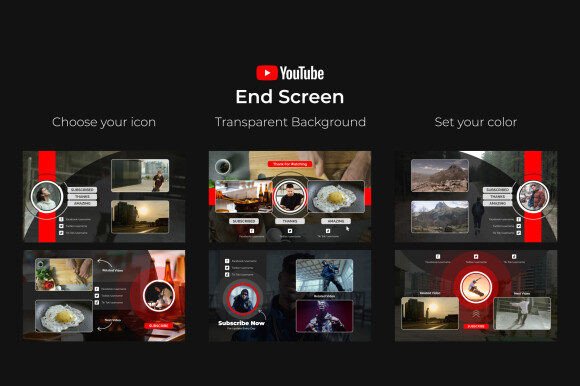
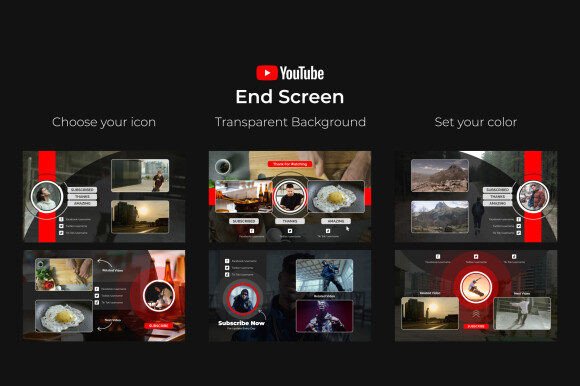
What makes a good end screen? It needs to be visually appealing enough to hold attention but structured clearly enough to direct the viewer's eye to the subscribe button, suggested video thumbnails, and social media links. The Youtube End Screen V2 template nails this balance with sleek, contemporary animations. The transitions are smooth and purposeful, avoiding the distracting, over-the-top effects that can feel dated. Its personality is professional and clean, making it suitable for a wide range of channels—from corporate marketing and tech reviews to lifestyle vlogs and creative tutorials. The transparent background is a critical feature, allowing the animations to layer seamlessly over your video's final moments without creating a jarring cut or a distracting solid color block. This design choice ensures the outro feels integrated with your content, not pasted on top of it.
The template's visual hierarchy is intuitive. Elements like social media icons and video placeholders are animated to appear in a logical sequence, guiding the viewer naturally. This is where the concept of visual hierarchy moves from theory to practical application. By controlling the timing and order of these elements, you can subconsciously tell your audience where to look first, second, and third, increasing the likelihood they'll interact with your desired call to action. It's a small detail that significantly impacts user engagement and, ultimately, your channel metrics.
Practical Customization for Real-World Use
A template's value is measured by how easily it adapts to your specific brand. This is where many pre-made assets fall short, but the Youtube End Screen V2 project is built for practical customization. The included Color & Icon Control Layer is the heart of this flexibility. Instead of digging through complex compositions to change a color or swap an icon, you have a single, centralized panel. This is a massive time-saver for busy creators and small business owners who need to maintain brand consistency across dozens of videos. You can set your primary and accent colors once, and the entire animation updates accordingly, ensuring every outro aligns perfectly with your brand identity.
The dropdown menu for choosing social media icons is another thoughtful feature. It includes three distinct icon styles, allowing you to select the design that best matches your channel's aesthetic—whether that's minimalist, bold, or playful. This level of control over design assets means the template can serve a fitness coach with a high-energy brand just as well as a book reviewer with a more subdued, intellectual style. The fact that it works with any font and includes the font link used in the demo removes another common barrier to customization. You can easily pair it with your existing brand typography, maintaining the consistency and professionalism that builds audience trust.
Integrating the Template into Your Workflow
For those new to After Effects, the included video tutorial is indispensable. It walks you through the process step-by-step, from importing the template to rendering your final outro. This focus on user education transforms the project from a static file into a learning tool. The well-organized project structure, with clearly labeled layers and compositions, means you won't waste time hunting for the right settings. It’s designed to be very easy to use, even for someone who considers themselves a beginner in motion graphics.
From a practical standpoint, here’s how to get the most out of it:
- Plan Your Content First: Before you open After Effects, decide which two videos or playlists you want to promote and what your main call to action is (subscribe, visit your website, etc.).
- Test with Your Brand Kit: Input your exact brand hex codes and fonts. Render a short preview to see how the colors and typefaces interact with the animations.
- Consider Your Video's Pacing: The template's animation speed is designed to be engaging but not rushed. If your video ends on a calm note, you might hold the final frame for a beat longer before the animation begins.
- Use the Transparent Background: This is the key to a seamless look. Edit your video's final seconds to include a simple, non-busy background (like a solid color or a blurred version of your scene) so the animated elements pop without visual clutter.
This template is more than just an After Effects project; it's a component of your channel's digital marketing toolkit. A consistent, professional outro reinforces your channel's brand perception and can significantly improve key metrics like average view duration and subscriber conversion rate. It’s an investment that pays dividends in audience growth and engagement, allowing you to present your content with the polish of a major creator, regardless of your channel's size. By focusing on user-friendly controls and a clean, adaptable design, the Youtube End Screen V2 template empowers you to create outros that not only look great but work hard for your channel's success.