Quotes Titles for Premiere Pro: A Modern Design Toolkit
Capturing attention in a fast-scrolling digital landscape requires more than just a good idea. It demands presentation. For video creators, marketers, and entrepreneurs, the way you deliver a message—whether it's an inspirational quote, a key statistic, or a customer testimonial—can make or break audience engagement. Static text on a screen often fails to hold interest. This is where thoughtful design and subtle motion come into play, transforming simple words into memorable visual statements.
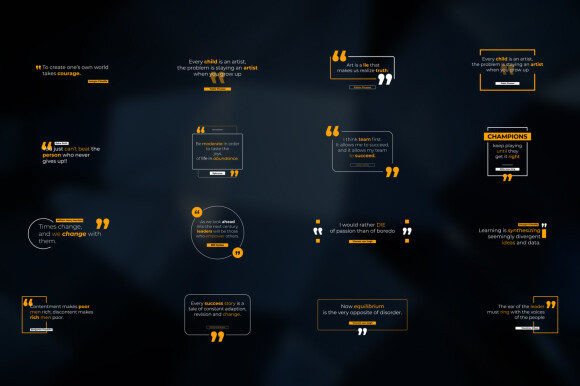
Quotes Titles for Premiere Pro is a template designed to solve this exact challenge. It's not a font in the traditional sense, but a powerful design asset for video editing. Think of it as a pre-built system for creating polished, animated text layouts within Adobe Premiere Pro. The project provides 16 Modern Quote Title designs, each with a distinct personality. These are not overly ornate or distracting; instead, they embody modern typography principles—clean lines, balanced compositions, and sophisticated animations that feel professional and intentional. The visual style leans towards minimalist elegance, making it versatile enough for corporate presentations, social media content, and creative portfolios alike.
Where This Template Truly Shines
The strength of Quotes Titles lies in its adaptability across a wide range of projects. For social media graphics and short-form video content like Instagram Reels or TikTok, these animated titles provide the punch needed to stop a viewer mid-scroll. A beautifully animated quote can serve as the centerpiece for a motivational post, a brand announcement, or a highlight reel. Entrepreneurs and small business owners can leverage these templates to create professional-looking video ads, product explainers, or customer testimonial compilations without hiring a motion graphics specialist.
Beyond social media, the applications extend into editorial design for digital magazines, YouTube video intros and lower thirds, and even packaging design concepts presented in video form. Bloggers and publishers can use them to create engaging video summaries of articles. The key is that the template handles the complex part—the animation and timing—allowing you to focus on your message and brand identity. It's a practical tool for anyone needing to enhance their video content with sophisticated text treatments quickly.
Practical Control for Consistent Branding
One of the most valuable features of this project is its deep customization. You are not locked into a single style. The Duration Control allows you to adjust how long each title stays on screen, matching the pacing of your voiceover or music. The In & Out Animation controls let you fine-tune the entrance and exit of your text, choosing from subtle fades, smooth slides, or other kinetic effects to match the tone of your project.
Crucially, the template states: "Use with any font, any color." This is a significant advantage for brand identity consistency. You can pair these animated layouts with your brand's specific typeface—whether it's a elegant serif font, a clean sans serif font, or even a distinctive script font. The included Video Tutorial makes this process straightforward, even for editors with basic Premiere Pro experience. By matching the font and color palette to your existing brand guidelines, you ensure that every video element reinforces recognition and professionalism.
Integrating into Your Workflow
Evaluating if Quotes Titles fits your project is simple. Consider your need for dynamic text presentation. If your videos feel static or if you're looking to elevate the production value of client work or personal content, this template offers a direct solution. The fact that it requires no plugins and is well organized means it integrates into a standard editing workflow without technical headaches.
For those concerned about typography, the project's flexibility with fonts is a major plus. You can experiment with different font pairing ideas directly within your timeline. Test a bold display font for the main quote and a complementary creative font for the attribution. The template's structure will handle the animation, letting you see how the visual hierarchy works in motion. This practical testing is invaluable for achieving the right balance between aesthetic appeal and readability.
In a content-driven world, tools that save time while raising quality are essential. Quotes Titles for Premiere Pro serves as a bridge between a raw idea and a polished, engaging final product. It empowers creators across disciplines—from designers crafting brand videos to marketers building campaign assets—to produce visually appealing and memorable content with efficiency and style.