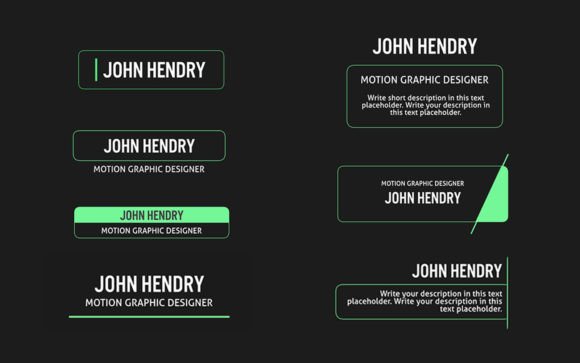
Elegant Titles for Final Cut Pro: A Designer's Guide
In the world of video content, the opening seconds are everything. A shaky, generic, or poorly designed title sequence can undermine an otherwise polished project before the story even begins. This is where thoughtful, professional motion graphics come into play. Elegant Titles for Final Cut Pro and Apple Motion is a template set designed to solve this exact problem, offering clean, sophisticated text animations that immediately elevate your production value. It’s not just about adding words to the screen; it’s about crafting a visual introduction that matches the quality of your footage.
The Visual Personality: More Than Just Words on Screen
At its core, Elegant Titles embodies a philosophy of modern minimalism. The animations are characterized by smooth, understated movements—think gentle fades, subtle slides, and precise reveals that draw the eye without causing distraction. The style leans heavily into contemporary design trends, favoring clean sans serif typography and ample negative space. This isn't the template for a loud, frenetic action reel or a gritty, distorted grunge aesthetic. Its personality is refined, confident, and professional. It communicates clarity and sophistication, making it a perfect display font system for projects where credibility and visual hierarchy are paramount. The visual appeal lies in its restraint; it respects the viewer's attention by enhancing the message rather than competing with it.
Where This Template Truly Shines: Applications and Projects
The versatility of Elegant Titles is one of its strongest assets. Its clean aesthetic makes it a chameleon, adaptable to a wide array of creative and commercial contexts. Consider its use in:
- Brand Identity & Marketing Videos: For entrepreneurs and small business owners, these titles are invaluable. Use them for product launches, service explainers, or brand story videos. The consistent, professional look helps build a coherent brand identity, ensuring every touchpoint looks polished. A well-animated logo reveal or a key value proposition statement can significantly boost audience engagement.
- Editorial and Publishing Content: Bloggers, publishers, and content creators can use these templates for YouTube intros, podcast trailers, or online course modules. The modular structure allows you to create a consistent visual language across all your video content, strengthening recognition. Imagine a weekly tutorial series or a book trailer where each title sequence feels both fresh and familiar.
- Creative and Design Projects: Designers and agencies can leverage these assets in client presentations, portfolio showcases, or social media graphics for Instagram Reels and TikTok. The ability to change the color easily means the titles can be perfectly matched to any client's color palette, ensuring brand consistency across all design assets.
- Personal and Commercial Use: Whether you're a hobbyist creating a family vacation montage or a crafter showcasing your work on Etsy, the professional finish of these animations adds a layer of credibility. The included tutorial makes it accessible even for those new to motion graphics, turning a personal project into something that looks like it was produced by a studio.
The Practical Impact on Your Video's Effectiveness
Choosing a template like Elegant Titles is a strategic decision that influences several key aspects of your video's performance. First, it directly impacts readability. The clean, well-spaced animations ensure your text is legible on any device, from a smartphone to a 4K monitor, which is critical for conveying your message quickly. Second, it establishes a clear visual hierarchy. By using these animations for main titles, lower thirds, and call-to-action text, you guide the viewer's eye through your content logically.
From a brand perception standpoint, the use of sleek, modern typography signals professionalism and attention to detail. It moves your content away from the look of default software presets and into the realm of considered design. This consistency across multiple videos fosters brand recognition; your audience will start to associate that specific style and movement with your content. Ultimately, this leads to better audience engagement. A viewer is more likely to stay through a video that looks polished and intentional from the first frame. The no plug-ins required aspect also means there are no technical barriers, allowing you to focus on creativity rather than troubleshooting software dependencies.
Making It Work for You: Practical Guidance
Integrating Elegant Titles into your workflow is straightforward, but a few practical tips will help you get the most out of the asset. Start by evaluating your project's tone. This template is ideal for corporate, educational, lifestyle, luxury, and general professional content. If your project demands a more playful, retro, or aggressively kinetic vibe, you may need to look elsewhere.
The font pairing is already curated, but take a moment to review the free font link included. Understanding the typeface will help you use it effectively in other parts of your project, like on-screen graphics or end cards, to maintain cohesion. Use the color control feature not just to match your brand, but to create contrast. Ensure your title text stands out clearly against your video footage—sometimes a simple drop shadow or a semi-transparent background bar can make all the difference in readability.
Because the template offers 10 elegant titles, think about using them strategically. Perhaps use a more elaborate animation for your main title, and a simpler, quicker version for section headers or key points. The modular structure is your friend here; you can mix and match to create a unique sequence that feels custom-built for your project. Always render a preview to check the timing and flow within your specific edit. The included tutorial is a valuable resource, so watch it to understand how to manipulate the controls efficiently.
In the end, Elegant Titles